


On 30 June 2026, Shopify Scripts stopped running. For years, Scripts were how Shopify Plus stores ran custom Ruby code at checkout: tiered discounts, “buy X get Y” rules, hiding shipping methods for certain products, reordering payment methods for B2B customers. Their replacement is Shopify Functions, and the deadline did not move again.
Most Plus stores migrated in time. But “migrated” often meant “the main promotion works”. The edge cases, the rules nobody documented and the interactions between discounts are where we keep finding problems months later. This is the audit we run.
What actually changed
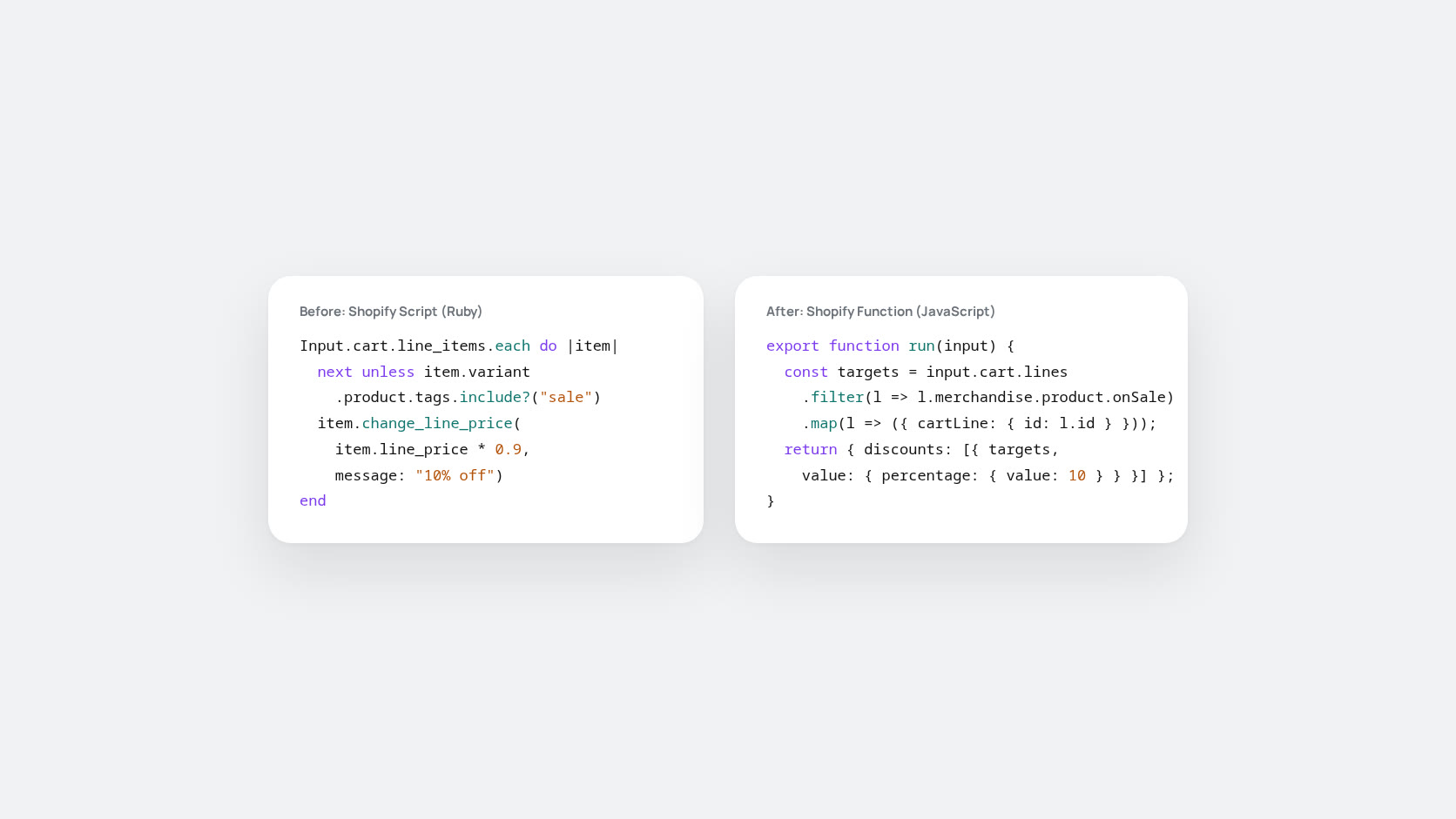
Scripts ran arbitrary Ruby inside Shopify’s checkout. Functions are compiled modules, usually written in Rust or JavaScript and compiled to WebAssembly, that plug into defined extension points: discounts, delivery customisation, payment customisation, cart validation and others. They are faster and more predictable, but they are not a one-to-one translation. Shopify provided no automatic converter, so every Script was rewritten by hand or replaced with an app.
Two differences cause most post-migration bugs:
- Discount combination rules. Scripts could apply their own logic on top of everything else. Functions-based discounts follow Shopify’s combination settings, so two promotions that used to stack might not, and vice versa.
- Plan availability. Discount Functions work on all plans. Delivery and payment customisations and checkout UI extensions are part of Checkout Extensibility on Shopify Plus. Stores that downgraded a plan or used a mix of apps sometimes lost a rule without noticing.
The post-migration audit
1. Build a list of every rule that Scripts used to enforce
Start from the old Script code, not from memory. Old Scripts often contained exceptions added years ago: excluded product tags, wholesale customer tags, minimum quantities, country rules. Write each rule down as one line of plain English.
2. Map each rule to what replaces it now
For each line: which Function, app or native setting does this now, and who owns it? Any rule without an answer is either deliberately dropped (write that down too) or a gap.
3. Test the combinations, not just the rules
Test real carts, not single products. Each test cart should combine rules:
- A discounted product plus a free-shipping threshold
- A wholesale customer with an automatic discount and a discount code
- A cart that crosses a tier boundary when one item is removed
- International addresses with shipping methods that should be hidden
- Subscription or pre-order products alongside normal ones
4. Compare margins before and after
The fastest way to find a silent discount bug is the numbers. Compare average discount per order, free-shipping rate and margin for comparable periods before and after 30 June. A sudden change with no matching campaign deserves a look.
5. Read the support tickets
Customers find these bugs before analytics do. Search support tickets since July for “discount”, “code”, “shipping” and “checkout”. Several similar complaints usually point to one rule.
Common findings
- Tiered discounts that apply on top of sale prices when they used to exclude them.
- Shipping methods that should be hidden for oversized or hazardous items showing up again.
- B2B customers seeing retail payment methods, or the reverse.
- A discount app and a custom Function both trying to do the same job.
Keeping Functions healthy
Functions are code, so they deserve the same habits as any other code: version control, a staging store for testing, a changelog, and a named owner. When a promotion is planned, include the Function or discount configuration in the campaign checklist, not as an afterthought the night before launch.
The Scripts era was flexible but fragile. Functions are stricter, and that is mostly a good thing. The stores that benefit are the ones that write down their rules rather than leaving them in code nobody reads.
If you would like a second opinion on your checkout logic, our team can help.