


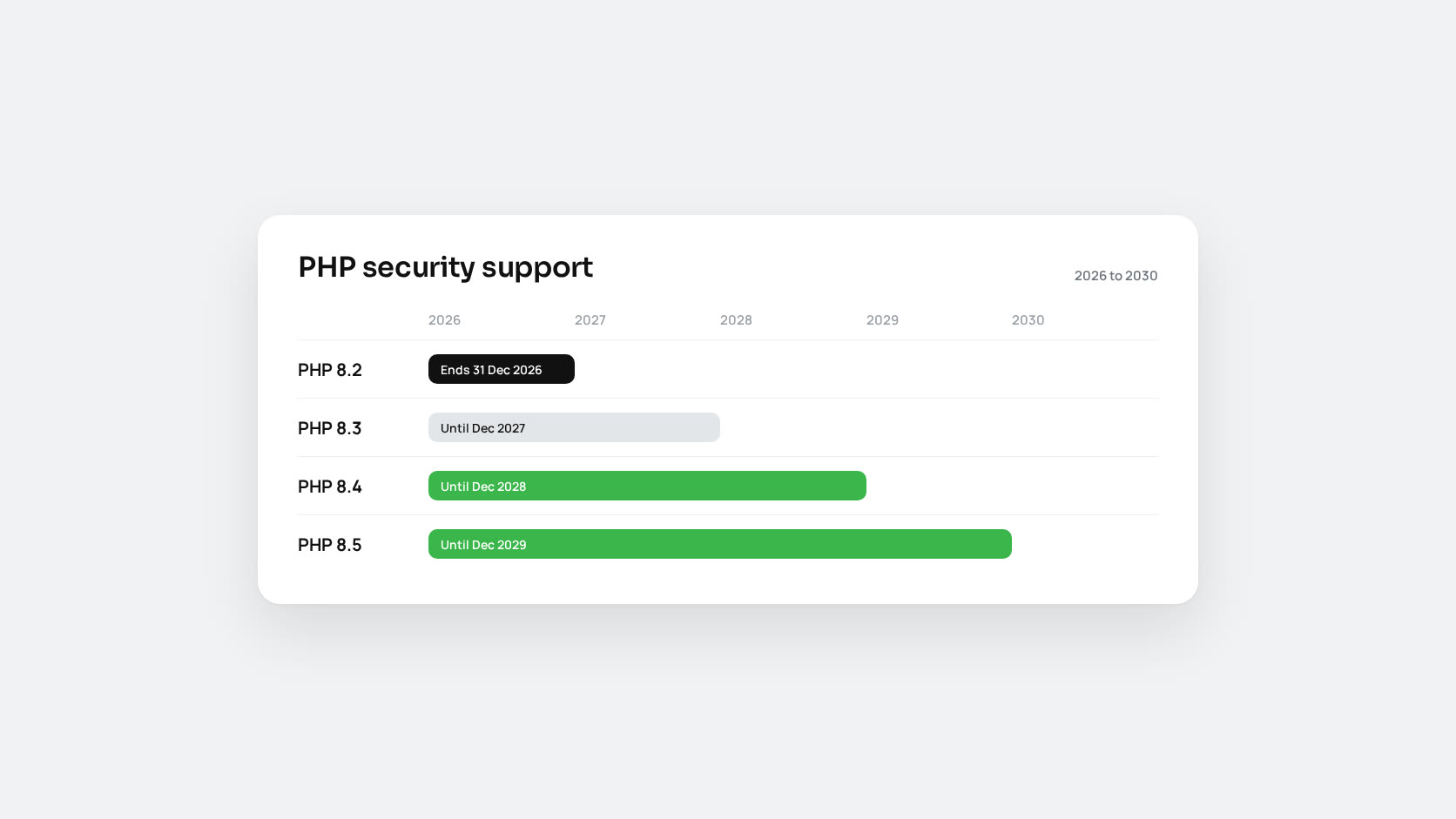
PHP 8.2 stops receiving security fixes on 31 December 2026. After that date, the next critical vulnerability in PHP will be fixed for 8.3, 8.4 and 8.5, and not for 8.2. The PHP2Shell release in October showed how that plays out: sites on supported branches installed a package, while sites on PHP 8.1 and older were left looking for backports.
If you still run 8.2, you have about two months. That is enough time for a careful upgrade, as long as you start now.
The current support timeline
| Version | Security fixes until | Notes |
|---|---|---|
| PHP 8.1 | 31 December 2025 | Already end of life |
| PHP 8.2 | 31 December 2026 | Security fixes only |
| PHP 8.3 | 31 December 2027 | Security fixes only |
| PHP 8.4 | 31 December 2028 | Active support |
| PHP 8.5 | 31 December 2029 | Active support |
Some hosting providers move earlier than the official date. Acquia moved customers off 8.2 in October, and WP Cloud removes 8.2 on 15 December 2026. Enterprise Linux vendors such as Red Hat can support their own 8.2 packages for longer, but that is the vendor’s support, not the PHP project’s, and only applies if you use their packages.
Which version should you move to?
Skip 8.3 unless something forces you to stop there. It only has one more year of security fixes, so you would be repeating this exercise in 2027.
PHP 8.4 is the safe default for most production systems in late 2026. It has been out for nearly two years, frameworks and extensions support it, and it is covered until the end of 2028.
PHP 8.5 gives you the longest runway, until the end of 2029, and the newest language features. It is a good choice for custom applications and for platforms that list it as supported. Check the platform first: Magento, WordPress plugins and commercial extensions each publish their own compatibility lists, and those lists decide the answer, not the PHP calendar. For Magento, Adobe’s system requirements page for your exact release is the reference.
What changed between 8.2 and 8.4
Most code written for 8.2 runs on 8.4 unchanged. The breaks that do appear tend to be the same handful.
Implicitly nullable parameters are deprecated in 8.4
This is the change you will see most often in older code and third-party libraries:
// Deprecated in PHP 8.4
function find(Customer $customer = null) { /* ... */ }

// Write the nullable type explicitly
function find(?Customer $customer = null) { /* ... */ }
Deprecations do not break anything on their own, but they flood logs and they become errors in a later major version. Fix them as part of the upgrade.
Other things worth checking
- Extensions that moved out of core into PECL in 8.4: IMAP, OCI8, PDO_OCI and pspell. If you rely on one, install it separately before you switch.
- Dynamic properties have been deprecated since 8.2. If you silenced those warnings rather than fixing them, they are still there.
- Any library pinned to an old major version in
composer.json. Old versions of popular packages often declare a maximum PHP version and will refuse to install.
Useful additions you get for free
PHP 8.3 added typed class constants, the #[\Override] attribute and json_validate(). PHP 8.4 added property hooks, asymmetric visibility (public private(set)), array_find() and array_any(), and lets you call methods on new Foo() without wrapping it in parentheses. None of these are required for the upgrade, but they are worth knowing about for new code.
A practical upgrade plan
Week 1: inventory
List every server, container and scheduled job that runs PHP, the exact version, where the packages come from, and which extensions are loaded (php -m, and the same for the FPM configuration). Note every Composer project and every commercial plugin or extension along with its vendor’s stated PHP support.
Week 2: static analysis
Let tools find the mechanical problems before people do:
- PHPCompatibility for PHP_CodeSniffer reports syntax and functions that do not exist or behave differently in the target version.
- Rector can rewrite many of them automatically, including explicit nullable types.
- PHPStan run with the target PHP version catches type problems the upgrade exposes.
composer require --dev phpcompatibility/php-compatibility
vendor/bin/phpcs -p src/ --standard=PHPCompatibility --runtime-set testVersion 8.4
Weeks 3 and 4: staging
Build a staging environment on the target version with the same extensions and configuration as production. Run your tests, then click through the flows that earn money: sign-up, login, checkout, payment callbacks, emails, imports and cron jobs. Keep error logging set to report deprecations and read the log every day.
Week 5: production
Install the new version alongside the old one where your platform allows it (Debian and Ubuntu packages can install side by side), switch one site or pool at a time, and keep the old pool configuration ready for a quick rollback. Remember OPcache, Composer platform settings (config.platform.php) and cron entries that call a specific php8.2 binary.
Afterwards
Remove the old PHP packages once you are confident, so nothing on the server can fall back to them, and add a reminder for the next end-of-life date. Two months is enough time for this upgrade. Two weeks usually is not.
If you would rather have someone else run the upgrade, our team can help, from the audit through to the production switch.