


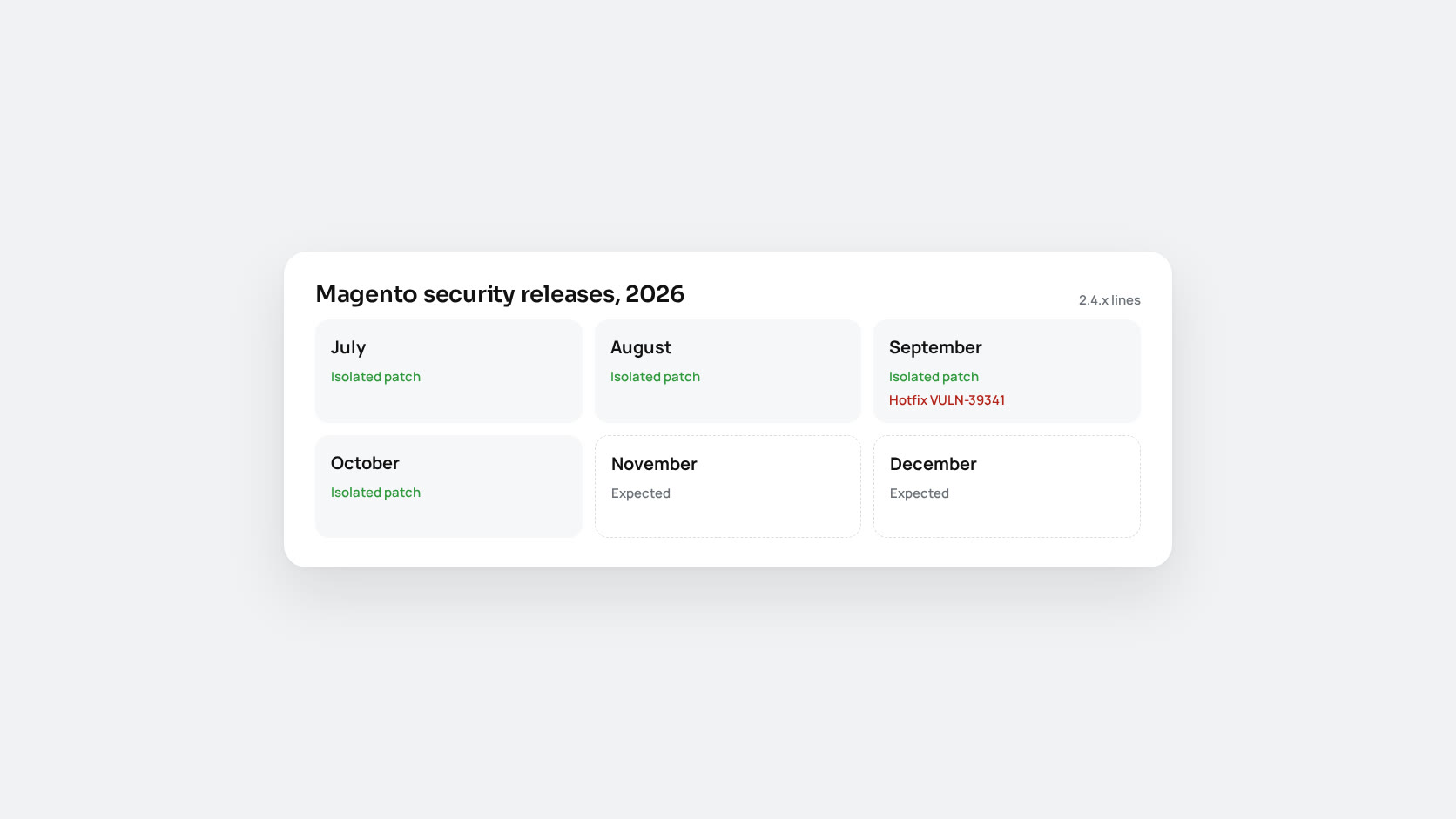
For most of Magento 2’s life, security updates arrived as a few large patch releases a year. Merchants planned around them: a quarterly maintenance window, an agency booking, a round of regression testing. That rhythm has changed. Since July 2026, Adobe has shipped security fixes for Adobe Commerce and Magento Open Source as monthly isolated patches, alongside one feature release each May.
This is good for security, but it changes how a store needs to be run and budgeted. Here is how the new cycle works and how to adapt.
How the cycle works now
| Release type | How often | What it contains |
|---|---|---|
| Isolated security patch | Monthly in practice since July 2026 | Individual, non-cumulative patch files for specific vulnerabilities |
| Security patch release (2.4.x-pN) | At least once a year per line | Rolls up earlier security, compliance and quality fixes |
| Full release (2.4.x) | Once a year, in May | New platform support, features and fixes, with one alpha and one beta beforehand |
| Emergency hotfix | When needed | Out-of-band fixes for actively exploited issues, such as VULN-39341 in September 2026 |
Every 2.4.x line is supported for three years from its release. 2.4.9, released in May 2026, is supported until May 2029. Based on that cadence, 2.4.10 is widely expected around May 2027, though Adobe had not published a date when we wrote this.
Why Adobe moved to isolated patches
Smaller patches can ship faster. A full patch release bundles dozens of changes and needs a full round of testing. An isolated patch touches a few files and can be reviewed in an afternoon. When a vulnerability is serious, the time between disclosure and protection is what matters, and isolated patches shorten it.
The 2026 timeline showed both sides of this. Isolated patches arrived in July, August and September. Then StyleSmuggler (CVE-2026-75650) was exploited as a zero-day in early September, and Adobe had a hotfix out three days after exploitation was detected. Stores with a monthly patch routine applied it the same day. Stores that had skipped several months first had to catch up on the patches the hotfix assumed were already there.
The catch: patches build on each other
Isolated patches are not cumulative, and Adobe’s instructions expect them to be applied in order on top of the latest security release for your line. Skip three months and you are not one step behind. You are three steps behind, each step with its own testing, applied under pressure the next time something urgent arrives.
There is a second catch. A full composer install or composer update restores vendor files to their packaged state. If patches are applied by hand, or outside your Composer workflow, a routine dependency update can quietly remove them. Keep patches in version control and apply them as part of every build, with tools such as cweagans/composer-patches or Adobe’s Quality Patches Tool.
What a sustainable routine looks like
- Read the bulletin on the day it is published. Note the severity, the affected versions and whether exploitation has been reported.
- Apply the patch to staging within a few days. Most isolated patches are small, so a focused test of checkout, customer accounts, the admin and the touched area is usually enough.
- Deploy to production inside a normal maintenance window, with the usual steps: maintenance mode, compile, static content deploy, cache flush, PHP-FPM reload.
- Record what was applied. A simple log of patch IDs and dates per environment saves hours when the next hotfix asks “is the August patch applied?”.
- Treat critical, exploited issues differently. A CVSS 10 that is being exploited goes to production the same day, with testing proportional to the risk.
The budget conversation
The older model put maintenance into a few large invoices a year. The new one is a small, steady monthly cost. Merchants who treat security as a project tend to fall behind. Merchants who treat it as an operating cost, like hosting, tend to stay current. If you work with an agency, a monthly patch-and-verify retainer is now more honest than quarterly upgrade projects.
Plan the yearly feature release separately. Moving from one 2.4.x line to the next is a project with extension audits and wider testing. Do it every year or two, so you never fall more than one line behind.
Know what you are running
None of this works if you are not sure which patches a store has. Magento has no built-in screen that shows applied isolated patches. Monitoring tools help here. MageMonitor, our own extension, includes patch level and PHP support dates in its security audit, but a well-kept log works too. What matters is that the answer is written down before you need it.